Git
les commandes Git les plus impotantes:
git init: Crée un nouveau dépôt Git (repository) dans ton dossier.
git clone[URL]: Télécharge un projet GitHub vers ton PC.
git status: Montre les fichiers ou ajoutés depuis le dernier commit.
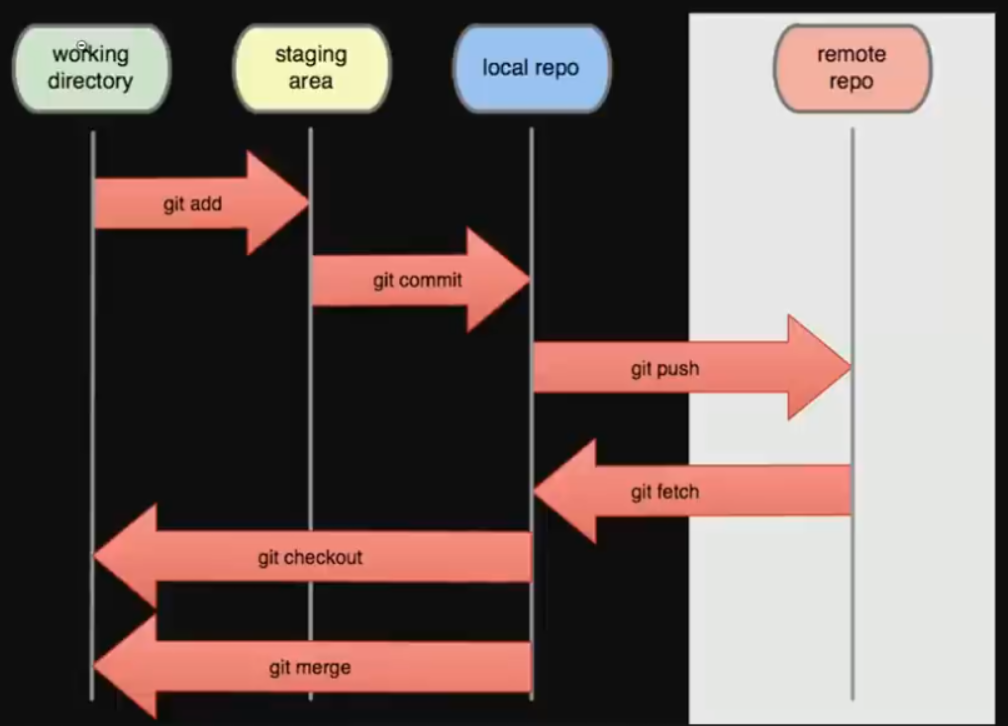
git add [ficher]: Prépare un fichier pour le prochain commit.(git add .: pour tout ajouter). \
git commit -m "message": Sauvegarde les changements localment avec un message.(ex: git commit -m "Ajout du header et du footer" ). \
git remote add origin[URL]: lie ton dossier local à dépôt GitHub. (ex:git remote add origin https://github.com/utilisateur/mon-projet.git). \
git push -u origin main: Envoie ton code vers GitHub (branche"main"). \
git pull: Récupère les derniéres modifications depuis GitHub.
Résumé du cycke habituel d'un développeur:
1) Tu crées ou modifies ton code.
1) Tu fais git add . pour préparer les fiches.
1) Tu fais git commit -m "..." pour sauvgarder localement.
1) Tu fais git push pour envoyer ton travail sur GitHub.
1) Tu fais git pull pour récupérer les changements des autres.
Exemple concret:
git init
git add .
git commit -m "Premier commit"
git branch -M main
git remote add origin https://github.com/ton-nom/mon-projet.git
git push -u origin main
Elziro
git clone https://github.com/Elzero-Courses/Git_Course.git
git status : ?
git add
git reset head
git commit -m "Createed The main Project Structure"
git branch > vu branche
git push RemoteName BranchName
git remote -v :?
origin https://github.com/Elzero-Courses/Git_Course.git (fetch)
origin https://github.com/Elzero-Courses/Git_Course.git (push)
git push origin master
BigData
- git config --global user.name "chokri bettaibi".
- git config --global user.email "Bettaibichokrino001@gmail.com".
adde the user for git
(blob,tree,commit=pinter(:rapport))=> object
git config --list
vu configiration
git init
add .git initiallaze this foder in git
git status | git status -s
trak fils en folder
git ls-files
trak fils en index
git add | fil1 & fil* & ...
file untrak to trak (y7athro)
git ls-files -s
ex: 100644 b7aec520ec0a7516c18eb64c68b64aeleb9b5a5e 0 file.txt >> shaOine code > this fils trackt
git commit -m
intialial commit (first commit)
git log
infor deta